AI Photo Studio & Hair Styler
- 3.5
- Rating
- 1.00M
- Installs
- Free
- Price
 Analysis by App-foxy
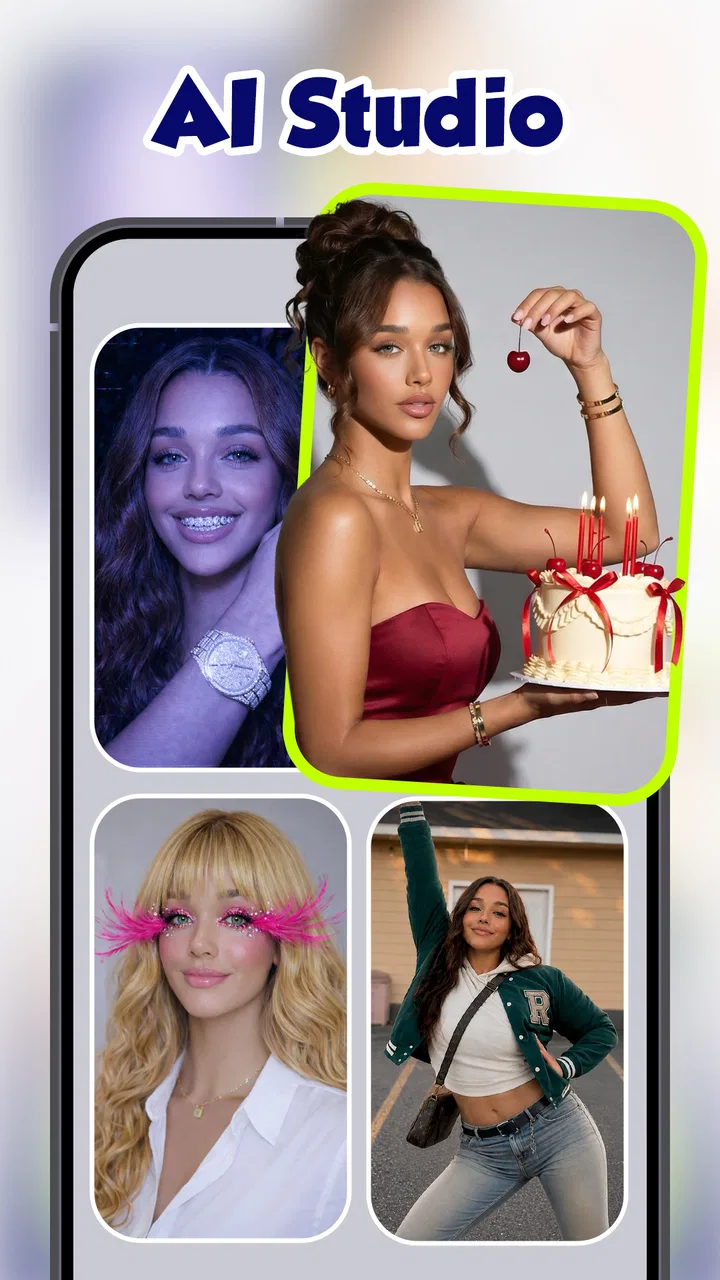
I spent time with AI Photo Studio & Hair Styler as a photography app, focusing mainly on the part that matters most in everyday use: trying different hair looks against my own face. The idea is simple, but the result is more useful than a basic sticker or color overlay because it gives you a quick visual reference before you make a real change. It is not a replacement for a stylist, and it does not turn every portrait into a convincing professional edit, yet it can be a practical way to narrow down ideas when you are unsure what might suit you.
The app is free to install and is aimed at Everyone. It comes from SPARK DYNAMICS YAZILIM HIZMETLERI LIMITED SIRKETI, and its store summary also points to AI dance effects and stadium-style video creation. Those extra tools make it broader than a single hairstyle editor, but the hair-styling workflow is where I found the clearest everyday value. If you want a fast, visual experiment rather than a full photo-editing suite, this is the part worth examining closely.
Hair previews that are useful before you commit
The strongest capability here is the chance to test a haircut or styling direction on a portrait instead of relying on imagination. When I look at a reference photo of a fringe, a shorter cut, or a different overall shape, the difficult question is always how that style will interact with my own forehead, cheeks, jawline, and hairline. A catalog image cannot answer that. An AI preview at least gives me a starting point.
You May Also Like

 Blood Strike: 2.5 Anniversary
Blood Strike’s Loadouts Turn Every Drop Into a Tactical Gamble
A close look at Blood Strike’s custom loadouts: how fast access to signature weapons reshapes its battle royale rhythm, rewards preparation, and narrows the gap between fights.

 Pandora - Music & Podcasts
Pandora’s Music Is Easy to Start, but Harder to Recover
Pandora’s strength is its low-effort path from a seed to a station. Its weak spot is how much confidence it asks you to place in connection, setup, and quiet recovery.

 8 Ball Pool
 Is Built on Rivalries, Rematches, and Routine
A close look at the rivalries, rematches, shared routines, and unanswered safety questions that turn a quick pool match into a persistent mobile community.

 Samsung Music
’s Quiet Strength Is Playing What You Already Own
Its reach comes less from spectacle than from dependable access to a personal library. That simplicity is both the app’s strongest retention engine and its ceiling.

 AccuWeather: Weather Radar
AccuWeather Review: A Quick, Clear Forecast for Everyday Decisions
For everyday plans, the best forecast is the one you can understand quickly. AccuWeather makes rain timing, radar, and local conditions easy to act on, with a few trade-offs.

 Hill Climb Racing
Why Hill Climb Racing Still Turns Crashes Into One More Run
A tiny car, a bumpy hill and one more upgrade: Hill Climb Racing keeps resurfacing because its simple chaos makes every near-miss feel personal.
More From Our News Desk



That distinction is important. I would not treat the generated image as a promise of what a barber or salon can reproduce. Hair has volume, texture, movement, and uneven growth, while a generated preview is still interpreting a flat image. Its real benefit is comparative: I can place several ideas beside one another and decide which direction feels closest to me. That makes the app more useful for preparation than for making a final decision on its own.
I also like this approach for people who change their mind at the last minute. A dramatic cut can look exciting in a saved reference image and completely wrong once it is considered against a particular face shape. Testing first can expose that mismatch early. Even when the result is not perfectly realistic, it may show that the length, parting, or framing is not appealing enough to pursue.
The feature becomes especially helpful when you use it to communicate with another person. Instead of telling a stylist, “I want something like this,” I can bring a small set of edited examples and explain what I like in each one. One image might have the right length but the wrong fringe; another might have a better outline but too much volume. That conversation is more precise than pointing at a model whose face and hair are completely different from mine.
What the preview can and cannot tell you
The app is best at showing the broad silhouette of a style. It can help me judge whether a cut seems soft, sharp, tidy, bold, or face-framing. It is less reliable for fine details such as how naturally individual strands blend into the original hair, how thick the hair will appear in real life, or whether a certain cut works with curls and waves. I would use it to choose a direction, not to predict the exact salon result.
Lighting also affects my judgment. A front-facing portrait with a clear outline gives the tool more to work with than a picture taken from below, in strong side light, or with hair already covering part of the face. If the source image is weak, the output can make the style look worse than it might in reality. That is not necessarily a failure of the hairstyle idea; sometimes it is simply a poor starting portrait.
For that reason, I recommend keeping the first test conservative. Begin with a photo where the face is visible and the head is reasonably straight. Then compare styles one at a time rather than changing the hairstyle, expression, pose, and background together. This makes it easier to understand whether the hair is actually working for you or whether another edit is influencing your reaction.
My practical workflow with a portrait
I would start by choosing a recent image that resembles how I normally look, rather than selecting an unusually flattering selfie. A realistic source gives a more useful answer. I would also avoid heavy filters, because smoothing and reshaping can make the face look different before the hair effect is even applied.
After creating a first preview, I would save the versions that feel promising and discard the ones that are clearly unhelpful. The important step is not producing a large collection of novelty images. It is reducing a vague idea to two or three workable options. If every variation is saved, the app becomes a gallery of possibilities instead of a decision-making tool.
A useful trick is to compare the style from the same portrait whenever possible. Changing the source photo makes the comparison less fair. A different angle can make a haircut look more flattering even when the hair itself has not improved. I find that consistent input keeps the experiment grounded and makes the result easier to explain to someone else.
Another practical step is to inspect the image at normal viewing size, not only while zoomed in. At close range, small blending errors can dominate my attention. At the size I would actually show on a phone, the overall shape is usually more important. This helps separate a genuinely useful preview from a technically imperfect image that still communicates the right idea.
Once I have a preferred direction, I would take the image to a professional and ask what needs adjusting for my actual hair. That final conversation matters because a stylist can account for texture, density, maintenance, and the way the cut will grow out. The app helps me arrive with a clearer request, but it should not be the only source of advice.
A realistic everyday use case
Imagine that I have a haircut appointment after work and have been considering a shorter style with more hair around the forehead. I have several saved examples, but none show how that shape might sit on my face. During a lunch break, I can use a clean portrait to test a few related looks. The goal is not to settle on an exact generated image. I want to find out whether I prefer the forehead more open, partly covered, or framed by a stronger side shape.
That short session can change the appointment from an uncertain conversation into a focused one. I can show the stylist the general outline I prefer and mention which parts of the preview do not feel right. If the result suggests that a full transformation is too much, I might ask for a smaller change first. This is where the app earns its place: it turns an abstract thought into something I can react to before making a lasting decision.
The same workflow can help someone preparing for a new job, a formal event, or a move to a different city. A person who normally avoids experimenting may feel more comfortable comparing options privately. It can also help friends give more useful feedback, although I would still keep the final choice with the person wearing the haircut.
Where the wider toolset fits
Although I am concentrating on hair styling, the app also presents itself as a home for AI dance filters and an AI stadium video generator. These features point toward a more playful side of the product. They may appeal to someone who wants to create short, attention-grabbing visual edits rather than carefully plan a haircut.
That broader focus is both a benefit and a limitation. It gives the app more reasons to keep on a phone, especially for casual photo and video experiments. On the other hand, anyone expecting the depth of a dedicated hair consultation tool may find the experience less focused. The hair workflow is convenient because it is quick, but the surrounding creative features can make the app feel more like an effects studio than a specialist styling assistant.
Compared with ordinary photo editors, the main difference is the starting point. A conventional editor is better when I want to adjust exposure, crop a picture, remove distractions, or make precise manual changes. This app is more interesting when I want an AI-generated interpretation of a visual idea. Compared with browsing hairstyle photos online, it gives me a personal reference instead of asking me to imagine the result on my own face.
A professional salon consultation remains better for decisions involving hair condition, maintenance, and technical feasibility. A dedicated manual editor may also be preferable if I need exact control over every part of the image. I see this app between those choices: more personal than a generic reference gallery, faster than a detailed editing workflow, but less authoritative than real-world advice.
The trade-offs I noticed
The first trade-off is realism versus speed. The appeal is that I can get an idea quickly, but quick generation cannot capture every physical detail of real hair. I would be cautious about judging texture, thickness, or how a style behaves in motion. A preview may look polished while still being impractical for my actual hair.
The second trade-off concerns expectations. AI images encourage me to focus on the finished appearance, while a real haircut also involves upkeep. A style that looks excellent immediately after editing may require daily shaping, regular trims, or products I do not normally use. The app does not replace that practical conversation, so I would ask a stylist how much work the chosen look demands before committing.
There is also a financial consideration inside an otherwise free app. The application can be installed without an upfront charge, while in-app purchases are listed from $7.99 to $99.99 per item. That range is wide enough that I would check the purchase screen carefully before confirming anything. For casual experimentation, I would first see how much can be done without paying and decide whether the extra tools justify the cost for my own routine.
The app has an average rating of 3.5 from around 5.6 thousand ratings, alongside more than 800 written reviews. I read that as a sign to keep expectations measured rather than assuming every result will be consistent. The product has also reached over 1 million installs, so it is not an obscure experiment, but popularity does not guarantee that every portrait or style will work equally well.
Another trade-off is that a generated result can tempt me to chase novelty. It is easy to keep trying increasingly dramatic looks because the process is entertaining. That is fine for creative play, but it can distract from the original question: which change would I genuinely be comfortable wearing? I get more value when I use the app to compare realistic options instead of treating every output as a candidate for real life.
Tips for getting a more useful result
- Use a clear, ordinary portrait: choose an image with the face visible, moderate lighting, and minimal effects. A realistic source is more helpful than a heavily edited selfie.
- Compare like with like: keep the same portrait while testing several styles so that changes in pose or lighting do not influence the decision.
- Judge the outline first: look at the relationship between the hair shape and your face before worrying about tiny strand details.
- Save only finalists: keeping a small shortlist makes it easier to explain your preference and prevents the experiment from becoming an unmanageable image collection.
- Ask about maintenance: show the preferred preview to a stylist and ask what the real cut would require as it grows out.
These steps also help answer a common concern: can the app be used for a serious haircut decision? My answer is yes, but only as an early planning aid. It can help me identify a direction and communicate it. It cannot tell me whether my hair texture, current length, or daily routine will support the look without adjustment.
Who will get the most from it?
I think the app suits curious people who want a low-pressure way to explore appearance changes. It is particularly useful for someone who keeps collecting hairstyle references but struggles to imagine them personally. It can also help a person preparing for a salon visit, provided the generated image is treated as a conversation starter rather than an exact specification.
It is less suitable for anyone who needs professional-grade retouching, detailed manual controls, or a dependable prediction of physical hair behavior. If my priority were color correction, portrait cleanup, or precise compositing, I would choose a conventional photography editor. If I needed a technically accurate haircut plan, I would rely more heavily on a stylist who can inspect my hair directly.
The app runs on Android with a minimum operating system requirement of 9, and the current version is 2.0.0.2. That makes compatibility worth checking before installation, especially on an older device. Since it is free to start and rated for Everyone, it is approachable for casual users, but the possible in-app purchase costs mean I would still pay attention during the first session.
My overall view is positive but deliberately practical. The hair-styling capability is not valuable because it predicts the future perfectly; it is valuable because it gives me something concrete to compare. When I use a good portrait, keep the experiment focused, and take the result to a professional for reality checking, the app can reduce uncertainty and make a haircut conversation easier.
I would recommend it to a friend who wants to explore a new look without immediately booking a major change. I would not recommend using it as the final authority, especially for a dramatic cut or a style that depends heavily on texture and maintenance. Its best role is a fast visual rehearsal: helpful before the decision, but not a substitute for the decision itself.
FAQs for AI Photo Studio & Hair Styler
01What is AI Photo Studio & Hair Styler?
AI Photo Studio & Hair Styler is a photo-editing app that uses artificial intelligence to transform portraits and experiment with different hairstyles. After uploading or taking a picture, users can typically preview haircuts, colors, styling effects, beauty adjustments, and creative photo enhancements. It is designed for entertainment, inspiration, and quick visual experimentation rather than replacing professional salon advice or a real-life consultation.
02How do I use AI Photo Studio & Hair Styler to try a new hairstyle?
To try a hairstyle, open the app and select a clear portrait from your gallery or capture a new photo with the camera. Follow the on-screen instructions to position your face, then choose a haircut, hair length, color, or styling effect from the available tools. Results can vary depending on lighting, image quality, face angle, and whether your hair is clearly visible in the original photograph.
03Is AI Photo Studio & Hair Styler free to download and use?
The application may be available to download at no initial cost, but some features can be restricted behind premium access, subscriptions, credits, or in-app purchases. Users should review the store listing and the payment screen carefully before confirming anything. Check whether advanced hairstyles, high-resolution exports, additional editing tools, or an ad-free experience require payment, and verify renewal terms for subscriptions.
04Does the app create realistic hairstyle and hair-color results?
AI Photo Studio & Hair Styler can produce convincing previews when you use a well-lit, front-facing image with a visible face and unobstructed hair. However, the results are simulated and may occasionally look uneven, especially around the hairline, ears, glasses, or facial edges. Colors and textures may also appear differently in real life, so treat the images as visual suggestions rather than guaranteed salon results.
05Are my photos safe when using AI Photo Studio & Hair Styler?
Before uploading personal photos, review the app’s privacy policy and the permissions requested on your Android or iOS device. AI editing may require images to be processed locally or sent to online servers, depending on the feature. Avoid uploading sensitive photographs unless you understand how they are stored, used, and deleted. Also check whether the app allows you to remove uploaded images or account data.
Pros
- Creates realistic hairstyle previews before making a salon appointment.
- Offers quick photo-based experimentation without special editing skills.
- Useful for comparing different cuts
- colors
- and styling ideas.
- Can provide inspiration when you are unsure what look to try.
- Convenient for testing appearance changes privately on your phone.
Cons
- Results may look inaccurate with poor lighting or unclear photos.
- Some hairstyles may not match your actual hair texture or volume.
- Advanced styles or features may require a subscription or in-app purchase.
- AI-generated images can occasionally distort facial or hair details.
- Uploading personal photos may raise privacy concerns for some users.

AI Photo Studio & Hair Styler
Gallery